

📺 Original Video: Openclaw Memory Mistake You’re Making Right Now by Openclaw Labs
📅 Duration: 11:00
Your OpenClaw Agent Has Amnesia. Here Are 4 Fixes.
TL;DR
- The default OpenClaw memory setup dumps everything into one file, wastes tokens, and confuses your agent
-
Method 1: Structured markdown folders — dead simple, works in 60 seconds, totally transparent
-
Method 2: Built-in memory_search — slick but needs an OpenAI/Gemini/Voyage API key even if you use Claude (most people miss this)
-
Method 3: Mem0 plugin — automated long-term memory with vector search, set-it-and-forget-it
-
Method 4: SQLite database — the hidden power move for dense structured data. No plugin needed.
The Problem
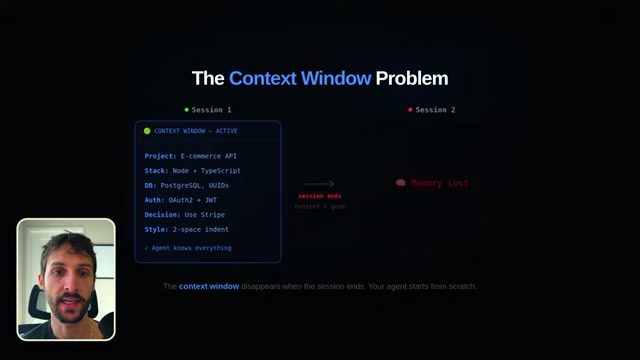
Every OpenClaw agent operates inside a context window. Think of it like short-term memory — whatever’s in that window, the agent can see. But the second a session ends, that window closes. Gone. ▶00:49
For a one-off question, that’s fine. But if you’re using OpenClaw the way it’s meant to be used — as an ongoing coding partner, research assistant, or collaborator — you need it to remember things between sessions. Your project, your preferences, decisions you already made. ▶01:06
The default setup? One massive memory file that gets read on every single request. Your agent burns through tokens re-reading everything, gets confused by irrelevant context, and you end up re-explaining the same stuff every session. ▶00:06
The Four Fixes
Method 1: Structured Memory Folders
The simplest approach and honestly underrated. ▶01:25
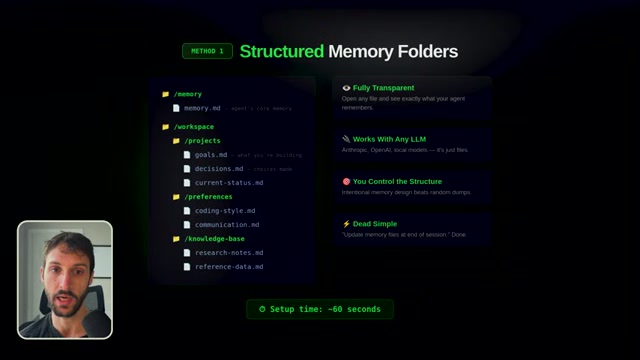
Create a dedicated folder structure in your project directory:
- A memory/ folder at the root level
- projects/ subfolder with `goals.md`, `decisions.md`, `current-status.md`
- preferences/ with `coding-style.md`, `communication-preferences.md`
- knowledge-base/ with `research-notes.md`, `references.md`
Then tell your agent in the system prompt: “At the end of every session, update the relevant files in the memory folder.” That’s the whole trick. ▶02:13
Why this works so well:
- Totally transparent — open the markdown files and see exactly what your agent remembers
- Works with any LLM — Anthropic, OpenAI, local models, doesn’t matter
- You control the structure — you decide what’s worth remembering
No vector databases. No black boxes. Just files. ▶02:23
Method 2: Built-in Memory Search
OpenClaw has a memory_search function built right in. It lets your agent store and retrieve memories with natural language. Say “remember that I prefer TypeScript over JavaScript” and it actually sticks. ▶03:00
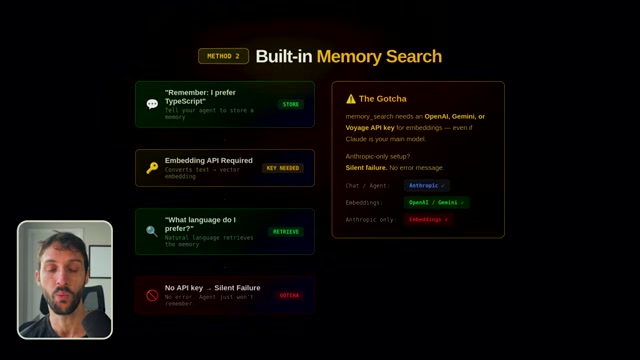
But here’s the catch that trips everyone up: memory_search requires an OpenAI, Gemini, or Voyage API key to function. It uses embedding models under the hood, and it’s turned off by default. ▶03:25
If you’re running Claude as your main LLM (and let’s be honest, a lot of OpenClaw users are), memory_search will silently fail. No error message. Your agent just won’t remember things and you’ll have no idea why. ▶03:47
The fix: add an OpenAI, Gemini, or Voyage API key in your OpenClaw settings specifically for the embedding layer. It doesn’t have to be your main model. The cost is fractions of a cent per call. ▶04:02
Method 3: Mem0 Plugin
For those who want automated, intelligent, set-it-and-forget-it memory. ▶05:06
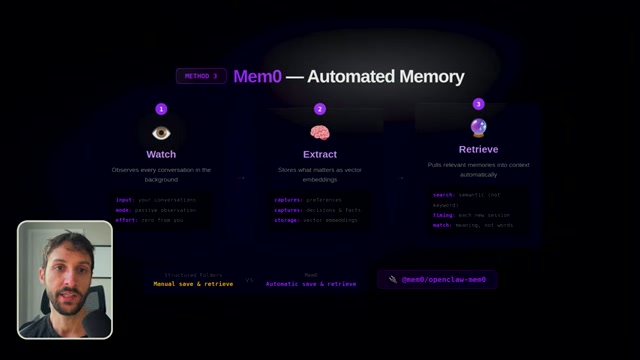
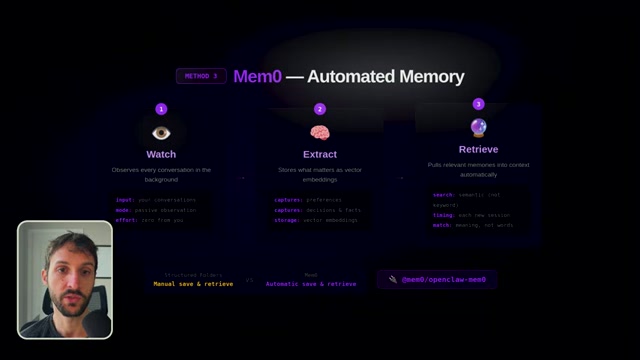
Mem0 (`mem0/openclaw-mem0`) uses vector search — it stores information as mathematical representations of meaning, not exact text. So if you told your agent 3 weeks ago that “our client prefers minimalist design” and today you ask about design direction, Mem0 surfaces that memory even though you used completely different words. ▶05:48
How it works automatically:
- Watches every conversation in the background ▶06:16
- Extracts what matters — preferences, decisions, facts, project details
- Retrieves the right memories and injects them into context when relevant
No manual work. Have a conversation today, close the session, come back tomorrow, and your agent actually remembers what happened. ▶07:20
The trade-off: it’s a third-party dependency. You’re sending data through Mem0’s infrastructure. Read their privacy docs if that matters to you.
Method 4: SQLite Database (The Hidden Power Move)
This is the one almost nobody talks about. ▶07:26
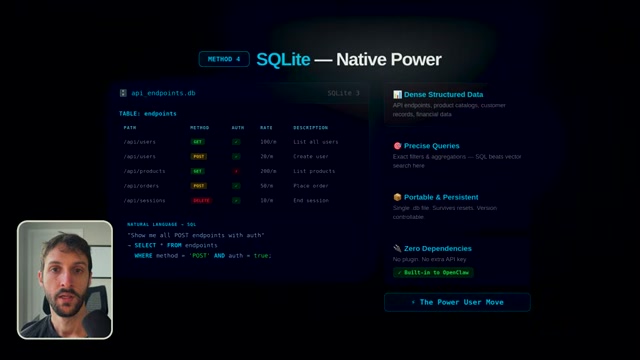
OpenClaw can natively read from and write to a SQLite database. No plugin. No extra API key. It’s just there. ▶07:37
Methods 1-3 are great for conversational memory. But what about dense structured data? Hundreds of API endpoints, product catalogs, customer records, research data with dozens of fields. Markdown files fall apart with that. Vector search is great for fuzzy retrieval, but sometimes you need exact queries: “Show me every API endpoint that uses POST and requires authentication.” That’s a SQL query. And SQL is really good at that. ▶07:55
Just tell your agent: “Create a SQLite database to track all our API endpoints. Store the path, HTTP method, auth requirement, rate limit, and description.” It creates the schema, populates it, and you can query it naturally. ▶08:23
Since SQLite is just a file, it’s portable, persistent, and survives session resets. You can even version control it.
The Full Memory Architecture
The best setups combine multiple methods: ▶09:07
- Context window = short-term memory (what’s happening right now)
- Structured folders + memory_search = medium-term memory (preferences, decisions)
- Mem0 = automated conversational recall (what happened last week)
- SQLite = long-term structured data store (precise queries on dense data)
You’ve essentially built a brain.

What to Do Next
Start with Method 1 today — takes about 5 minutes. ▶10:25
Then add Mem0 or SQLite depending on your use case. And make sure memory_search is configured with the right API key — that’s the one that catches most people.
We try hard to get the details right, but nobody’s perfect. Spot something off? Let us know