
📺 Original Video: How to Make Claude Code 100X Better in 1 Click by Julian Goldie SEO
📅 Duration: 10:48
TL;DR
- A free, open-source GitHub project called “The Agency” installs 61 specialist AI agents into Claude Code, Cursor, Windsurf, and more
- One command sets up nine departments of agents: engineering, design, marketing, product, testing, and beyond
- Each agent has a distinct personality, workflow, and deliverables, way beyond generic “act like a developer” prompts
- You can stack multiple agents in parallel for complex projects like building websites or running marketing campaigns
- 12,000+ GitHub stars, though the creator wisely notes that metric can be gamed
The Problem
▶00:00 Out of the box, Claude Code is powerful but generic. You’re basically working with one generalist assistant. Ask it to build a website and it’ll do a decent job, but it won’t think like a senior front-end developer who obsesses over core web vitals and React best practices. Julian Goldie found a project that claims to fix this by turning your AI coding tool into a full agency of specialists.
The Solution (Step by Step)
▶00:33 Step 1: Install with one command. Open Claude Code and paste the setup command (available in the video description). Claude Code handles the rest automatically. Within seconds, it confirms your agents are installed and organized into categories.
▶01:05 Step 2: Browse your new team. After installation, you get nine divisions: engineering, design, marketing, product management, project management, testing, support, spatial computing, and specialized. That’s 61 agents total, each one a .md skill file with its own personality, workflow, success metrics, and communication style. Think front-end developers, brand designers, Reddit marketing specialists, Instagram curators, content creators, and more.
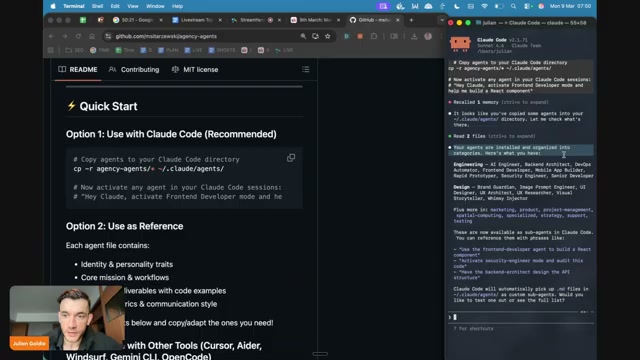
▶01:38 Step 3: Put them to work. Just tell Claude Code which agent to use in plain language. Julian demonstrates by saying “create a new website for the AI Profit Boardroom using the front-end developer agent.” Claude Code spawns the specialist sub-agent and gets building.
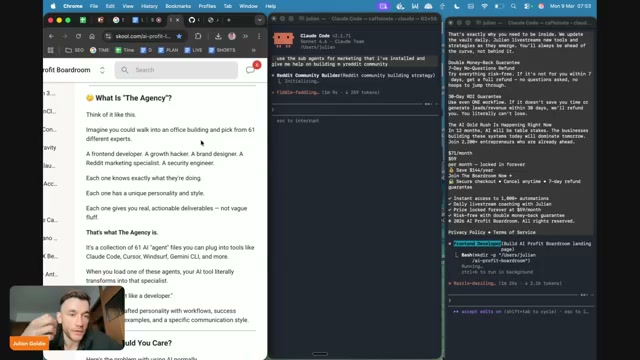
▶02:28 Step 4: Run agents in parallel. You can open multiple terminal sessions and have different agents working simultaneously. While the front-end developer builds a website in one window, the Reddit community builder drafts a 30-day growth plan in another.
▶06:01 Step 5: Stack agents for bigger campaigns. For a full marketing push, Julian activates five agents at once: content creator, Twitter engager, Instagram curator, and more. They all launch in parallel inside Claude Code, each handling their piece of the campaign.
Key Concepts
▶02:58 What makes this different from generic prompts? A regular prompt like “act like a developer” gives you surface-level role-playing. Each Agency agent file contains a deeply crafted personality with specific workflows, code examples, deliverables, and success metrics. It’s the difference between asking a random intern to help versus bringing in someone who’s done this exact job a hundred times.
▶07:24 Tool compatibility. The Agency works with seven tools: Claude Code, Cursor, Windsurf, ADA, OpenCode, and AntiGravity. Julian tried it inside OpenClaw too, but it pushed back and said it wasn’t designed for this setup. His take: stick with Claude Code for the cleanest experience.
Pro Tips & Gotchas
- Security warning: Julian specifically calls out that you should always check the skill .md files before installing anything external. You could even rewrite them yourself and install your own versions instead. Solid advice.
- Not magic, just better prompting. At its core, this is a well-organized collection of system prompts. The real value is that someone spent the time crafting 61 detailed agent personas so you don’t have to.
- The 12,000 stars thing. Julian himself admits GitHub stars can be manipulated, which is refreshingly honest for a YouTube tech video.
- Parallel sessions work great. Having multiple Claude Code windows running different agents simultaneously is where this setup really shines over using one agent at a time.
Bottom Line
▶04:59 The website comparison tells the story. Same content, but the Agency-built version came out noticeably cleaner with better UI elements, nicer animations, and a more polished layout. Is it “100x better” like the title claims? That’s classic YouTube hyperbole. But the idea of pre-built, deeply crafted agent personas that you can mix and match is genuinely useful. If you use Claude Code or Cursor regularly, this is worth the 30 seconds it takes to install. Just, you know, actually read the skill files first.

We try hard to get the details right, but nobody’s perfect. Spot something off? Let us know